Android guide

DoneDeal price history on your Android phone

The DoneDeal app can't run extensions, and neither can Chrome on Android. Firefox can. Install Firefox, add DD Price Tracker, and browse DoneDeal in Firefox instead of the app. Every ad you open then shows its price history under the price.

About five minutes. Free, no account, works on any Android phone that can run Firefox.
Why Firefox, and not the DoneDeal app
The DoneDeal appApps don't allow extensions, so nothing can be added to it. DD Price Tracker can't appear inside the app, ever.
Chrome, Samsung Internet and the restChrome for Android doesn't run extensions at all. The other mainstream Android browsers don't run this one.
Firefox for AndroidRuns the same extension as Firefox on a laptop. It's free on Google Play and has for years been the one Android browser that does this.

So the deal is simple: to see price history on your phone, open DoneDeal in Firefox rather than in the DoneDeal app. Everything else about DoneDeal works the same in Firefox: searching, saving ads, messaging sellers, logging in.

Step by step

Set it up in seven steps

Every picture is a real screenshot from a Pixel 6a running Firefox 155, taken on 10 September 2026. Yours may differ a little with the Firefox version and your phone.

1

Install Firefox from Google Play

Open the Play Store on your phone, search for Firefox and tap Install on Firefox Fast & Private Browser by Mozilla. It's free and takes under a minute.

Already have Firefox? The button reads Open instead. Make sure it's up to date: DD Price Tracker needs Firefox 142 or newer, which is what Google Play installs today.

The first time Firefox opens it shows two welcome screens. Tap Continue, and on the second screen either Set as default browser (handy, see step 7) or Not now.

Open Firefox on Google Play
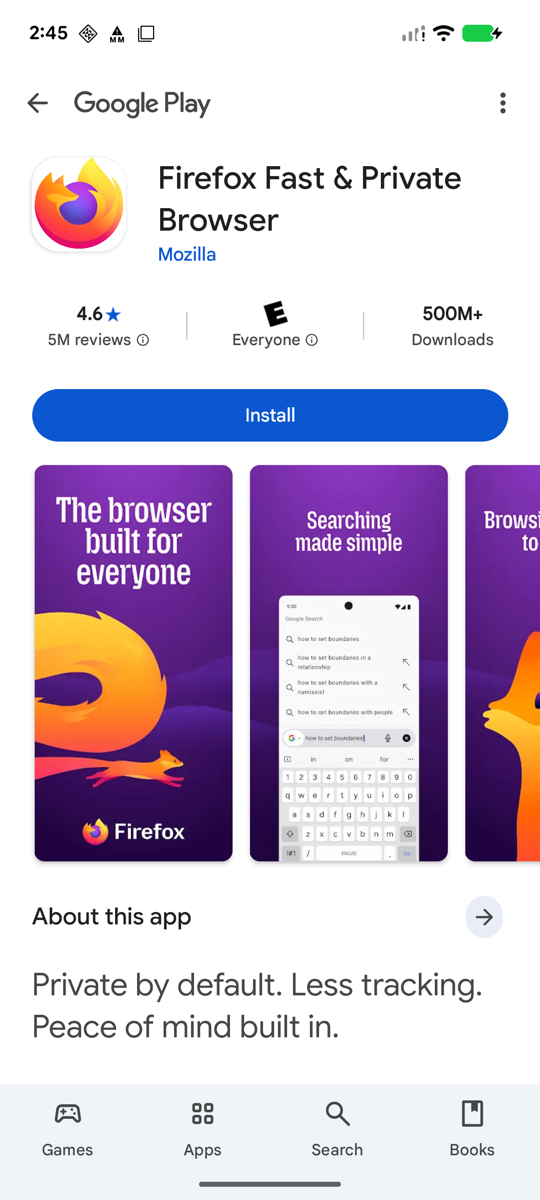
Google Play listing for Firefox Fast and Private Browser by Mozilla, 4.6 stars, 500 million downloads, with a blue Install button
Screenshot: Google Play on a Pixel 6a
2

Open the DD Price Tracker page in Firefox

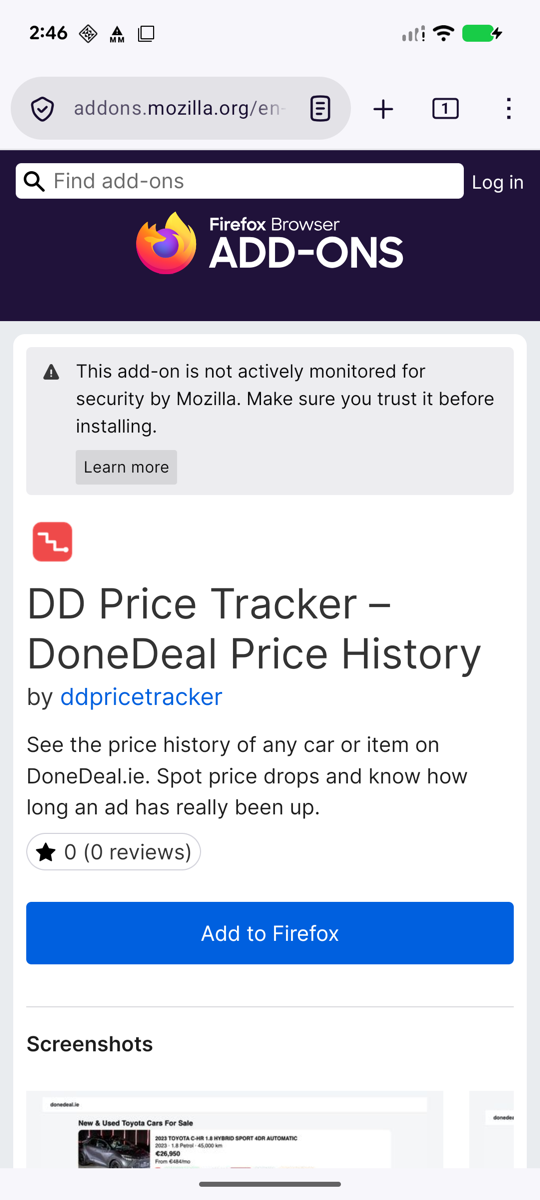
In Firefox, go to ddpricetracker.com/android and tap the Add DD Price Tracker to Firefox button at the bottom of this page. It opens the extension's page on Mozilla's add-ons site, with a blue Add to Firefox button.

Or search for it: tap the menu in Firefox, then Extensions, then Manage extensions and search for DD Price Tracker.

The “not actively monitored for security by Mozilla” notice appears on every extension outside Mozilla's small hand-picked Recommended list. It describes Mozilla's review programme, not anything found in the extension. The code is the same as the Chrome version and the privacy policy says exactly what it reads.
The DD Price Tracker page on addons.mozilla.org in Firefox for Android, with the blue Add to Firefox button
Screenshot: Firefox 155 on a Pixel 6a
3

Tap Add, then OK

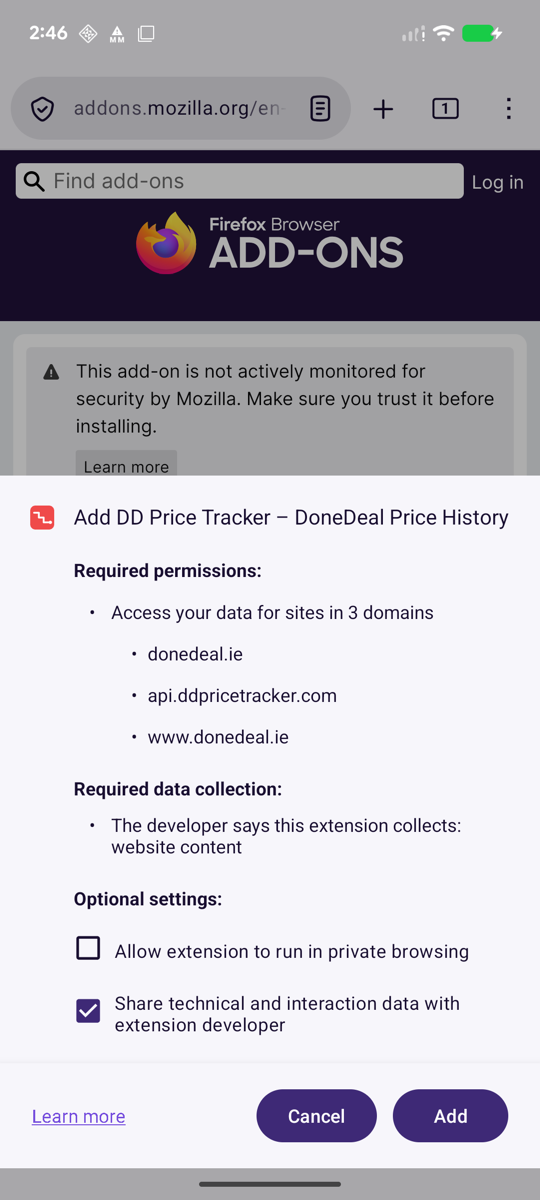
Firefox shows what the extension asks for. Required permissions: your data on each car-listing site it works on — donedeal.ie, usedcarsni.com, autotrader.co.uk and the five Japanese exporter sites — and on api.ddpricetracker.com, which is our own server where the shared price history lives. Required data collection: website content, meaning the listing details it reads off the page. (The picture above was taken before version 1.3.0, when the list was DoneDeal only; the dialog is the same, the list is longer.)

Two optional switches: Allow extension to run in private browsing, off unless you want it, and Share technical and interaction data with extension developer, on by default. That second one is the anonymous usage count described in the privacy policy; untick it if you'd rather not. Then tap Add.

Firefox opens our welcome page and confirms DD Price Tracker was added. Tap OK. That's the install done.

What it reads: the ad number, price, date and the public spec of the vehicle on pages you open. Never seller names, phone numbers, photos or your DoneDeal account. Privacy policy.
Firefox's install dialog: Add DD Price Tracker, required permissions for donedeal.ie, api.ddpricetracker.com and www.donedeal.ie, required data collection website content, two optional switches, and Cancel and Add buttons
Screenshot: Firefox 155 on a Pixel 6a
4

Open DoneDeal in Firefox and tap any ad

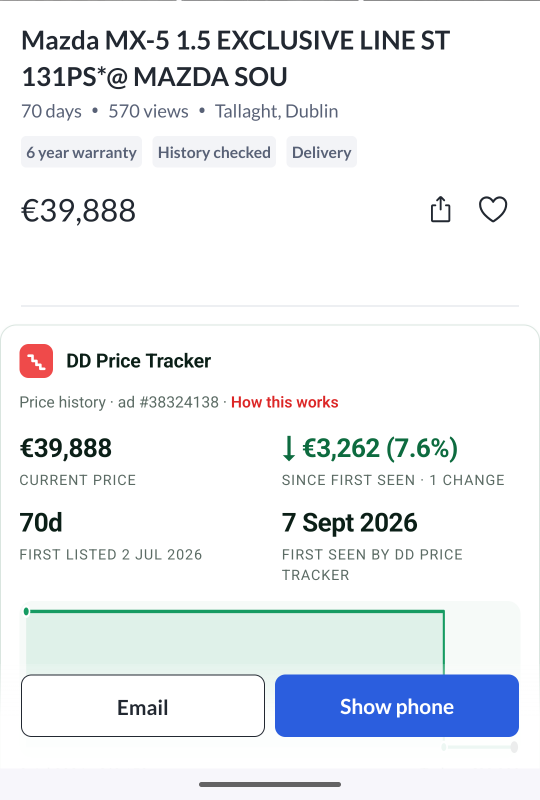
Type donedeal.ie into Firefox and open an ad the way you normally would. Under the price you'll see the DD Price Tracker panel: the current price, how much it has dropped or risen, the date it was really first listed, and a chart of every change.

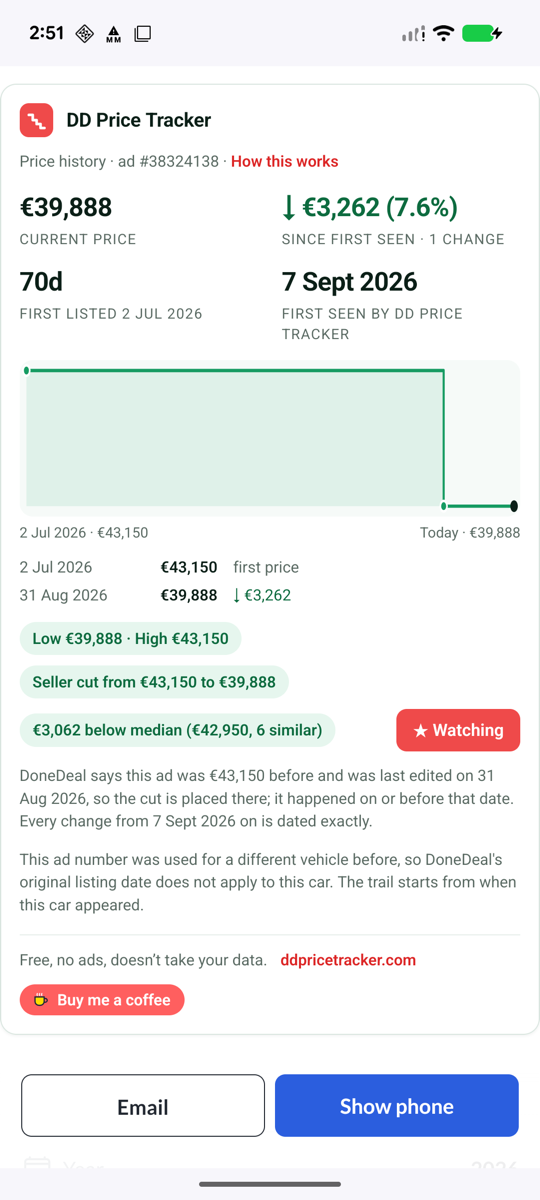
Scroll on for the dated list of changes, the low and the high, and how the price compares with the median of similar cars listed right now.

No history on an ad? A history builds up as people with the extension open that ad. Where DoneDeal itself shows a previous price you see it straight away; otherwise the panel fills in over the following days.
A DoneDeal ad in Firefox for Android: a Mazda MX-5 at €39,888 with the DD Price Tracker panel below the price showing a €3,262 drop, 7.6 percent, since first seen, first listed 2 July 2026
Screenshot: Firefox 155 on a Pixel 6a
5

Watch an ad you're interested in

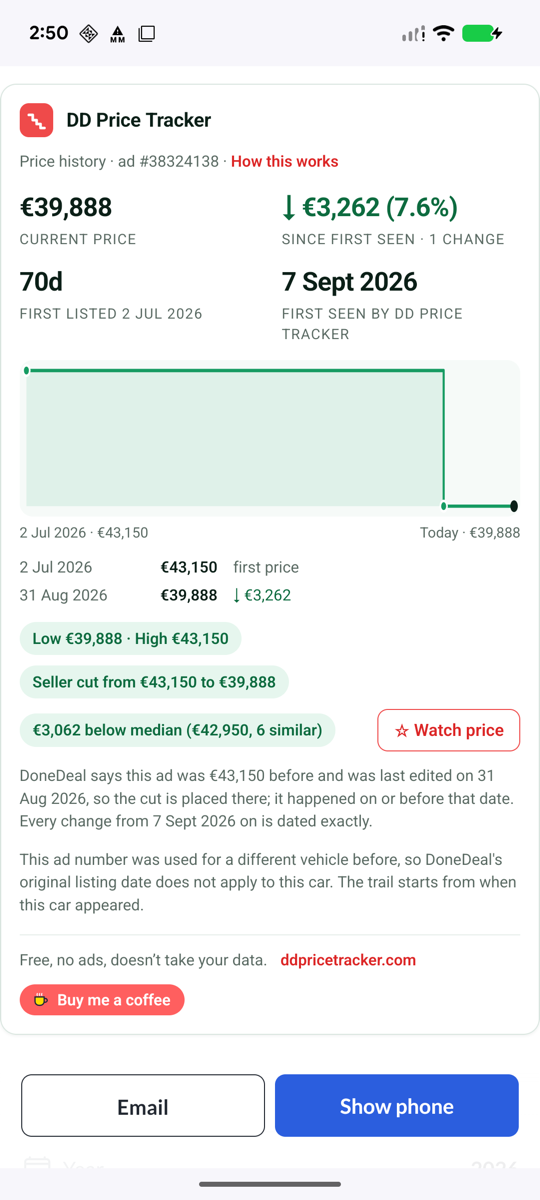
Tap Watch price at the bottom of the panel. The button turns red and reads Watching, and the ad joins your watchlist, stored on your own phone.

Every time you open Firefox's DD Price Tracker page (next step) you'll see the current price and the total change for each watched ad, so you can check on a car without scrolling through DoneDeal again.

The full DD Price Tracker panel on a phone: €39,888 current price, a €3,262 drop, first listed 2 July 2026, a step chart, the dated change list, Low and High, Seller cut from €43,150 to €39,888, €3,062 below median of 6 similar cars, and a red Watching button
Screenshot: Firefox 155 on a Pixel 6a
6

Open your list from the Firefox menu

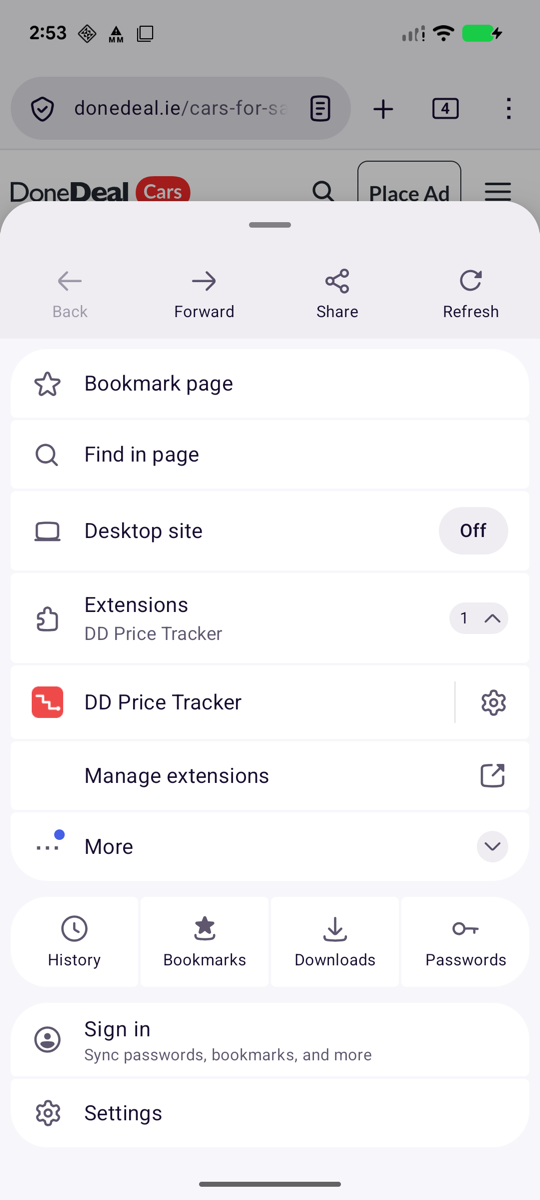
Tap the menu in Firefox. The menu has an Extensions row with DD Price Tracker named under it. Tap the small 1 ⌄ on the right to expand it, then tap DD Price Tracker.

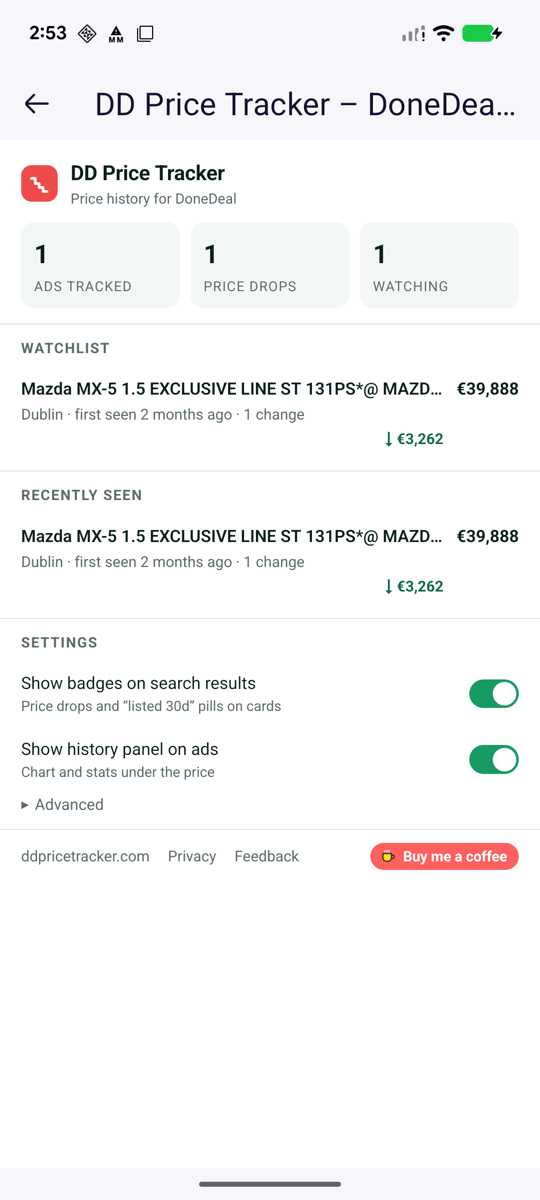
It opens as a full-screen page: how many ads you've tracked, your watchlist, the ads you've seen recently and the two settings. On a laptop the same thing is a small pop-up; on a phone Firefox gives it the whole screen.

Manage extensions on the same row is where you turn the extension off, remove it, or change the two optional switches later.

The Firefox for Android menu open over a DoneDeal ad, with the Extensions row expanded to show DD Price Tracker with a settings cog and a Manage extensions link
Screenshot: Firefox 155 on a Pixel 6a
7

Make Firefox your DoneDeal browser

The extension only works on pages opened in Firefox, so two small changes save you thinking about it:

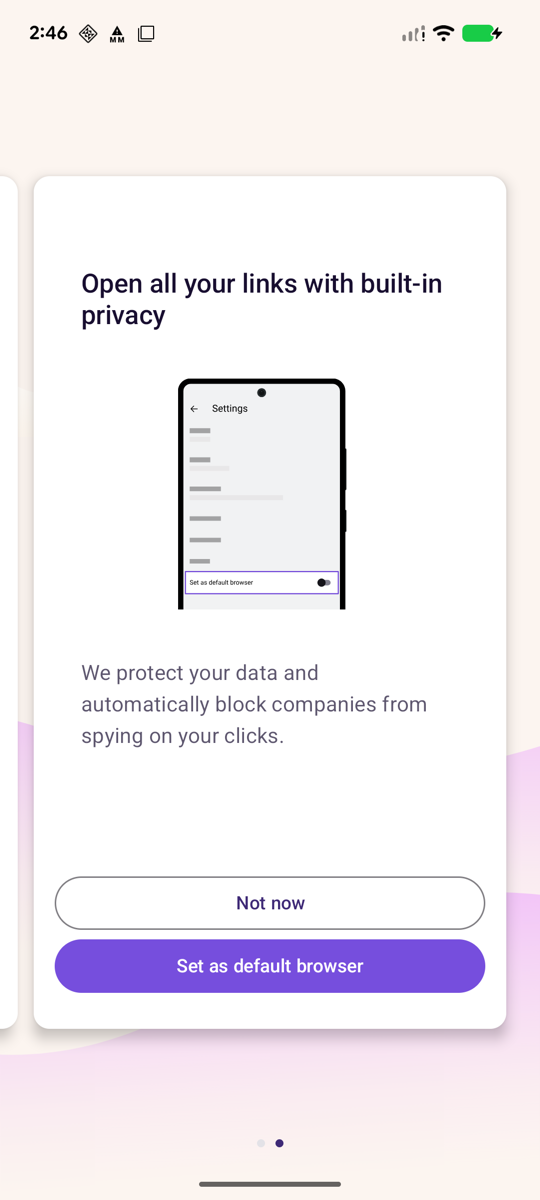
Set Firefox as your default browser. Firefox offers this on its second welcome screen, pictured. Later, open Firefox and tap SettingsSet as default browser, or go to Android SettingsAppsDefault appsBrowser app and pick Firefox. DoneDeal links from WhatsApp, Facebook and email then open in Firefox.

Put DoneDeal on your home screen. With donedeal.ie open in Firefox, tap , expand More and choose Add to Home screen. You get a DoneDeal icon that opens in Firefox, with the price history built in.

Still have the DoneDeal app installed? Android may keep sending DoneDeal links to it. Either uninstall the app, or go to Settings → Apps → DoneDeal → Open by default and turn off opening supported links. Long-pressing a link and choosing “Open in Firefox” works too.
Firefox's welcome screen titled Open all your links with built-in privacy, with Not now and Set as default browser buttons
Screenshot: Firefox 155 on a Pixel 6a
Day to day

What changes when you browse in Firefox

Nothing about DoneDeal itself. Three things about how you read it.

The panel under every price

Every price change we've seen, the low and the high, and how the asking price compares with the median of similar cars listed now.

The real first-listed date

Bumping an ad resets DoneDeal's “2 days” label. The panel keeps the date the ad first appeared, so a “fresh” listing that has been up since July is obvious.

Badges on search results

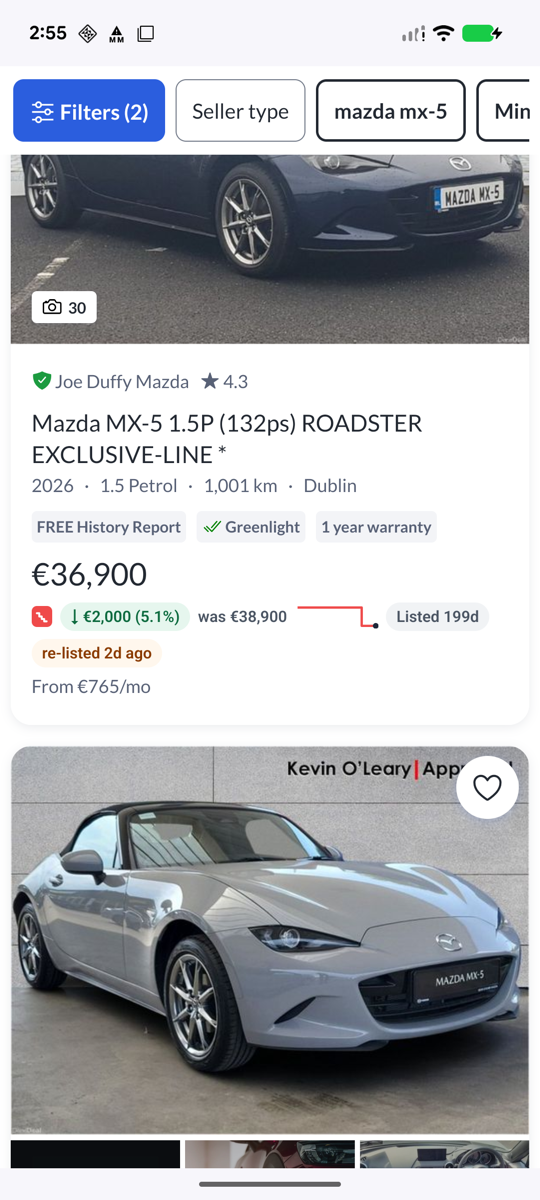
Scrolling a search, you see drops, rises, how long an ad has been up and when it was re-listed, flagged on the cards before you open them.

Common questions

Android questions

The ones we get asked most.

Can you add it to the DoneDeal app instead?

No. Android apps don't allow browser extensions, and DoneDeal's app isn't ours to change. The only way to see price history on a phone is to browse DoneDeal in a browser that runs extensions, which on Android is Firefox. The DoneDeal website in Firefox does everything the app does.

Does it work in Chrome on my phone?

No. Chrome for Android doesn't run extensions of any kind, so the Chrome Web Store listing only works on a laptop or desktop. On the phone it has to be Firefox.

Samsung Internet, Brave, Edge or Opera on Android?

None of them runs this extension. Firefox for Android is the one mainstream Android browser that runs the same extensions as its desktop version.

What about iPhone and iPad?

It is live. Install it from the App Store and it runs in Safari on iPhone, iPad and Mac — one app, one download. The iPhone guide walks through it. Firefox and Chrome on iPhone can't run extensions, so Safari is the route there.

Will it slow Firefox down or drain the battery?

No. The extension only runs on the car-listing sites named in its Sites list, reads what's already on the page and sends a few hundred bytes per ad to our server. It does nothing in the background and nothing on other sites.

Do I need an account?

No account, no sign-up, no cookies. Your watchlist and recently viewed ads are stored on your phone. Prices and dates of public listings are shared anonymously so every user sees the same history. Details in the privacy policy.

Two taps

Get it on your Android phone

Install Firefox from Google Play, then add DD Price Tracker from Firefox's add-ons site. Open both links on your phone.

Using a laptop? The Chrome and Firefox desktop versions are on the home page. Stuck? Email ddpricetracker@gmail.com and say which phone and Firefox version you have.

Firefox is a trade mark of the Mozilla Foundation; Android and Google Play are trade marks of Google LLC.

What the Irish used-car market did last month

One short email a month: which models moved, where the falls are steepest, and what a year of age is costing. Nothing else, no forwarding, and one click unsubscribes and deletes your address. How we handle it.