iPhone and iPad guide

DoneDeal price history on your iPhone

The DoneDeal app can’t run extensions, and on an iPhone neither can Chrome or Firefox. Safari can. Install the free app, switch it on in Safari, and every DoneDeal ad you open shows its price history under the price.

About two minutes. Free, no account, iOS or iPadOS 15.4 and newer.
Why Safari, and not the DoneDeal app
The DoneDeal appApps don’t allow extensions, so nothing can be added to it. DD Price Tracker can’t appear inside the app, ever.
Chrome and Firefox on iPhoneEvery iOS browser runs Apple’s engine underneath, but only Safari loads Safari extensions. On a laptop those two run it fine.
SafariOne free app from the App Store covers iPhone, iPad and Mac, and it reads only the car-listing sites in its Sites list.

So the deal is simple: to see price history on your phone, open DoneDeal in Safari rather than in the DoneDeal app. Everything else about DoneDeal works the same in Safari: searching, saving ads, messaging sellers, logging in.

Step by step

Set it up in four steps

Two of the four are Apple’s, not ours: iOS installs a Safari extension switched off and reading nothing until you say otherwise. That is the whole reason this page is longer than “tap Get”.

Every screenshot below was taken on iOS 26.5 on 17 September 2026. Apple moves this wording between versions, so if a button on your phone reads something else, the shape of the choice is still the one described here.

1

Install it from the App Store

Open the App Store on your iPhone or iPad, search for DD Price Tracker and tap Get. It is free, there is no account, and it is the same app on iPhone, iPad and Mac. It needs iOS or iPadOS 15.4 or newer.

Open it in the App Store
2

Turn it on in Safari

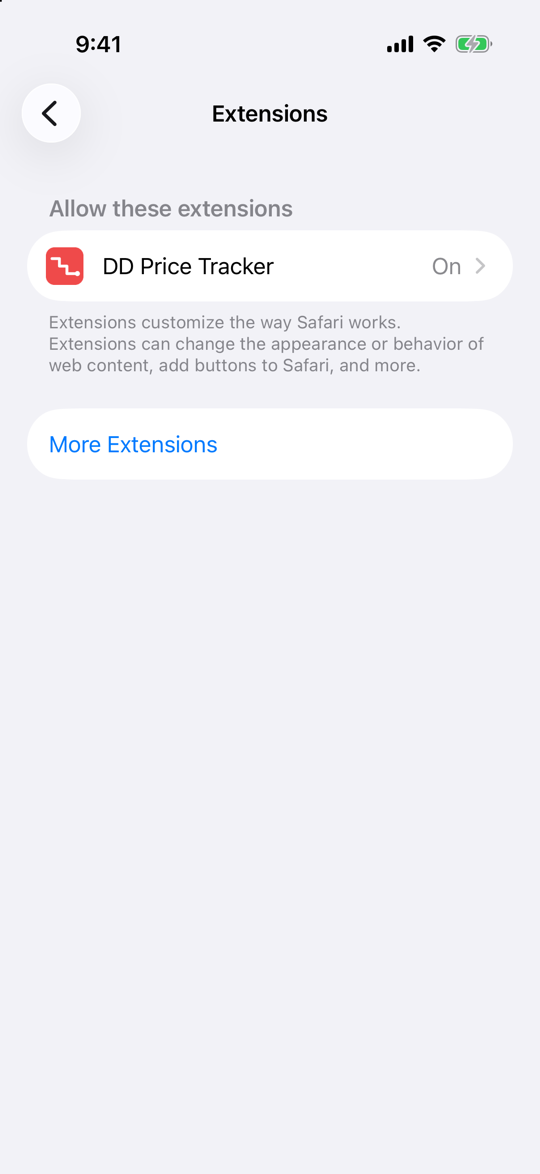
Installing an app does not switch its Safari extension on - iOS leaves that to you. Open Settings, tap Apps, then Safari, then Extensions. DD Price Tracker is in the list under Allow these extensions; tap it and turn Allow Extension on. The row then reads On, as in the picture.

On iOS 17 and earlier Safari sits at the top level of Settings rather than under Apps, and the list carries the switch itself rather than a row you tap into. Same two screens either way.

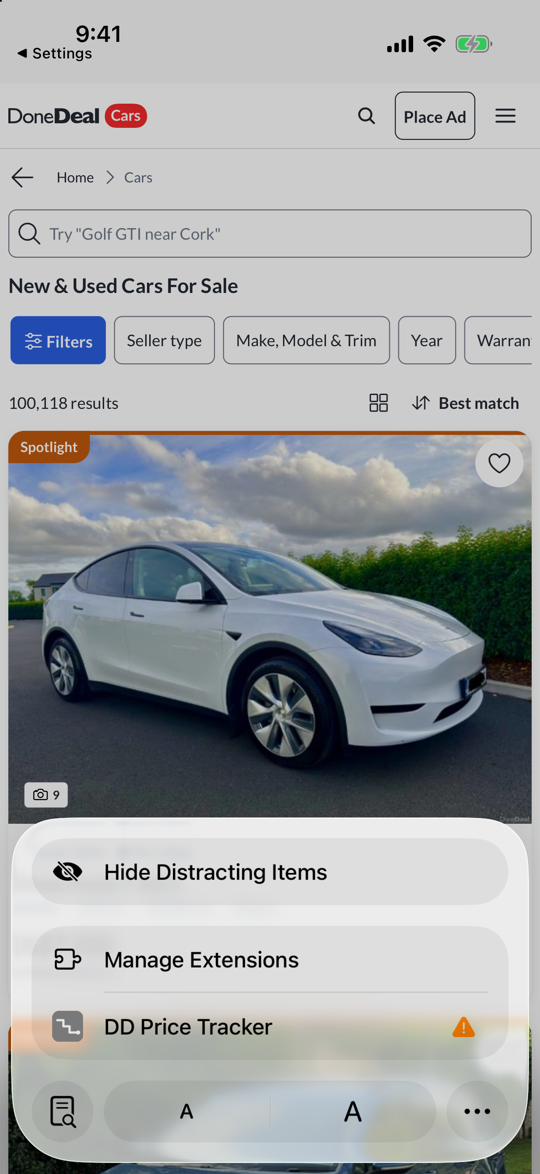
There is a second way in, and it is the quicker one if Safari is already open: tap the page menu in the address bar, tap Manage Extensions, and switch DD Price Tracker on there.

Why iOS asks at all. A Safari extension arrives switched off and reading nothing. Apple makes you turn it on, and then makes you say which websites it may read. Two taps, and they are the two taps that keep an extension from being something that installs itself into your browsing.
Settings, Apps, Safari, Extensions on an iPhone: under the heading Allow these extensions, one row reading DD Price Tracker with the value On
Screenshot: iOS 26.5
3

Allow it on DoneDeal

Safari asks which sites an extension may read before it reads any of them. Open donedeal.ie in Safari and tap the page menu in the address bar. DD Price Tracker is listed there with an orange warning beside it until you answer; tap it.

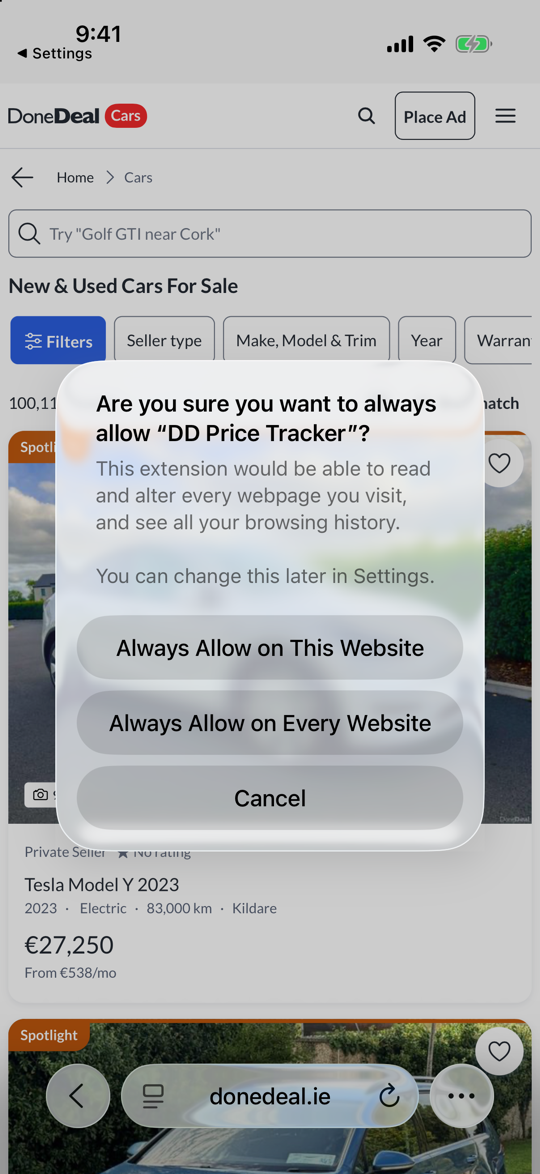
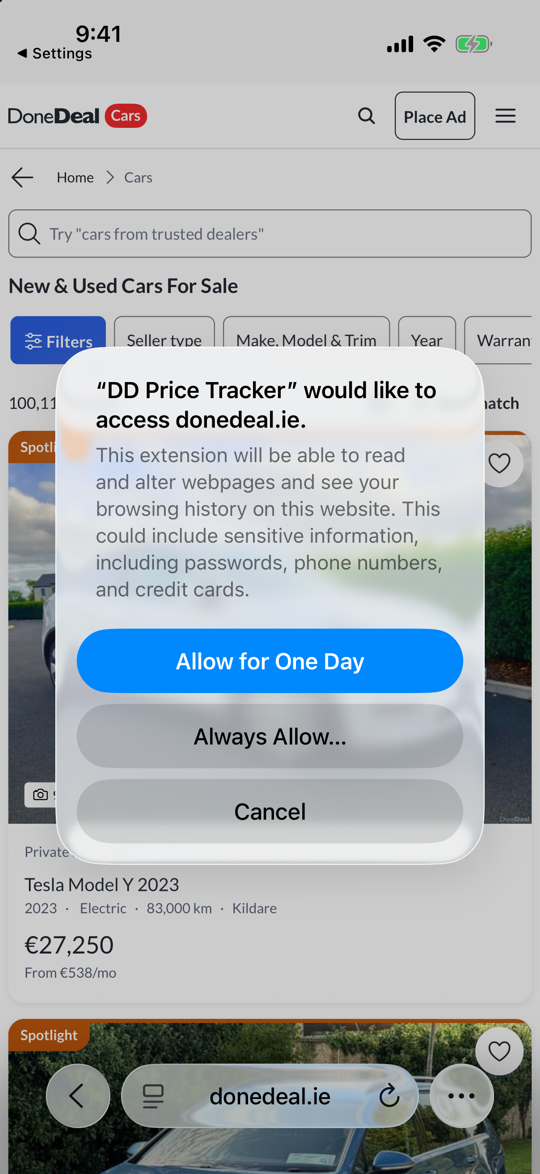
Safari asks “DD Price Tracker” would like to access donedeal.ie and offers three buttons. Allow for One Day is the blue one and it wears off; tap Always Allow… underneath it instead.

That opens a second sheet asking whether you are sure. It offers Always Allow on This Website and Always Allow on Every Website. Tap the first one. It is the narrower of the two and it is all the extension needs: DoneDeal, and nothing else you ever visit.

The warning is Apple’s standard text and it covers what any extension with page access could do, not what this one does. What it reads: the ad number, price, date and public spec of the vehicle on pages you open yourself. Never seller names, phone numbers, photos or your DoneDeal account. Privacy policy.
Safari's permission sheet over a DoneDeal page: DD Price Tracker would like to access donedeal.ie, with the buttons Allow for One Day, Always Allow and Cancel
Screenshot: Safari on iOS 26.5
4

Open any DoneDeal ad in Safari

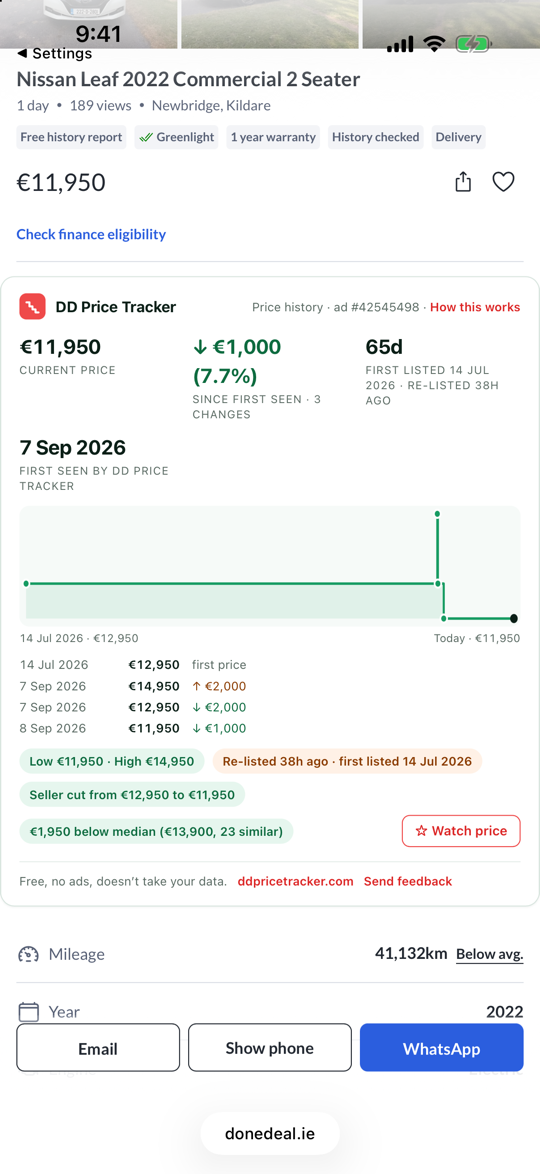
Open an ad the way you normally would. Under the price you will see the DD Price Tracker panel: what the seller is asking now, every change since the ad first appeared, the date it was really first listed, and how it compares with similar cars listed today.

The car beside this step is a real one, and the two lines are worth reading together. DoneDeal says “1 day”. The panel says the ad has been up for 65 days, since 14 July, and was re-listed 38 hours ago - which is the “1 day” DoneDeal is counting. It also has the asking price going up to €14,950 before it came back down, a seller’s cut from €12,950 to €11,950, and €11,950 sitting €1,950 under what 23 similar cars are asking.

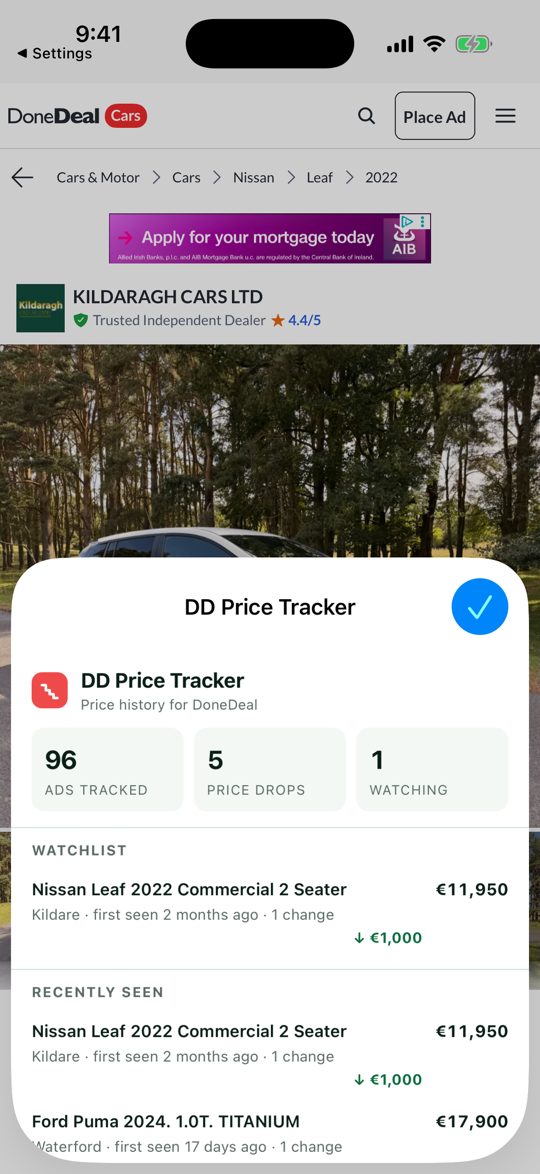
Tap Watch price at the bottom of the panel and the ad joins a watchlist kept on your own device. The extension’s own button in the page menu opens that list.

A DoneDeal ad in Safari on iPhone: a Nissan Leaf at €11,950 which DoneDeal labels 1 day old, with the DD Price Tracker panel below the price showing a €1,000 drop of 7.7 percent, 65 days since it was first listed on 14 July 2026 and re-listed 38 hours ago, a step chart, the dated list of four price changes, low €11,950 and high €14,950, €1,950 below the median of 23 similar cars, and a Watch price button
Screenshot: Safari on iOS 26.5

The screens in between

What steps 3 and 4 look like on either side of the picture above.

Day to day

What changes when you browse in Safari

Nothing about DoneDeal itself. Three things about how you read it.

Every ad carries its history

The panel sits under the price on every ad you open: what it started at, every cut since, and the date the ad really first appeared rather than the date it was last re-listed.

Nothing to open, nothing to check

There is no app to remember. You browse DoneDeal the way you always did, in Safari, and the history is already on the page when you get there.

A watchlist on your own phone

Tap Watch price on an ad you are thinking about. The list is kept on your device, not on our server, and the panel tells you what has moved since you looked.

Common questions

iPhone questions

The ones we get asked most.

Does it work in the DoneDeal app?

No, and it never can. iOS apps cannot load browser extensions, so nothing can be added to the DoneDeal app by us or by anyone else. Open DoneDeal in Safari instead and everything else about it works exactly the same: searching, saved ads, messaging sellers, logging in.

What about Chrome or Firefox on my iPhone?

Every browser on iOS runs Apple's WebKit engine underneath, but only Safari loads Safari web extensions. Chrome, Firefox and Edge on an iPhone cannot run this one. On a laptop they can - the Chrome and Firefox versions are on the home page.

Does it work on an iPad?

Yes. One app covers iPhone, iPad and Mac, and the steps above are the same on an iPad. The panel has more room to breathe on the bigger screen.

I installed it and nothing shows up under the price.

Two things are worth checking, in this order. Is the extension switched on in Settings, Apps, Safari, Extensions? And has it been allowed on donedeal.ie - step 3 - rather than left on "ask"? If both are right and the panel is still missing, email ddpricetracker@gmail.com with your iOS version and we will work it out.

What does it read, and what does it keep?

The ad number, the asking price, the date and the public spec of the vehicle on ads you open yourself. Never seller names, phone numbers, photos, descriptions or your DoneDeal account, and there is no account and no install ID on our side either. The privacy policy is the full version.

Is it really free?

Yes: free, no ads, no trial, nothing to subscribe to. The iPhone and Mac apps carry no tip link at all, because Apple's rules do not allow an app to send you to an outside page to tip. If it saves you money on a car and you would like to say thanks, there is a coffee link at the bottom of this page — on the website, where Apple’s rule does not reach.

I have an Android phone as well.

It runs there too, in Firefox rather than in Chrome or the DoneDeal app. The Android guide walks through it.
Free, no account

Get it on your iPhone

One app for iPhone, iPad and Mac. Install it, switch it on in Safari, and the next DoneDeal ad you open has its price history sitting under the price.

On a laptop instead? The Chrome and Firefox versions are on the home page. On Android it runs in Firefox: the Android guide. Stuck? Email ddpricetracker@gmail.com and say which iOS version you have.

iPhone, iPad, Safari, App Store and iOS are trade marks of Apple Inc. DD Price Tracker is not affiliated with or endorsed by Apple, DoneDeal or Distilled Media.

What the Irish used-car market did last month

One short email a month: which models moved, where the falls are steepest, and what a year of age is costing. Nothing else, no forwarding, and one click unsubscribes and deletes your address. How we handle it.